Musicbrainz Picard OR MP3Tag
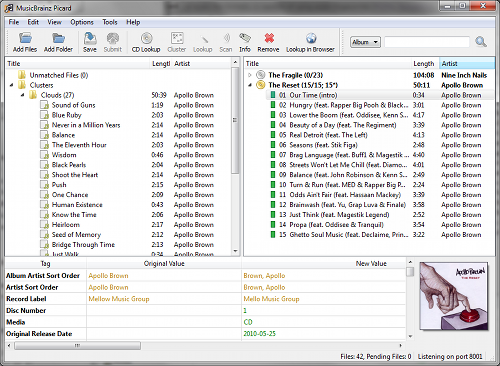

Picard allows you to tag music with information from their extensive database and MP3Tag requires you to input the information.
Welcome to the tagging section. Here we will go into what software can be used to ensure your music player displays information about the music you just downloaded, if you used lucida.to and enabled metadata you don't need to do this, but it's still recommended.
There's really two options.
Musicbrainz Picard
OR
MP3Tag
Picard allows you to tag music with information from their extensive database and MP3Tag requires you to input the information.
From here we will be continuing with Picard as it's really the best option.
Drag your downloaded music folder into the left panel. It's likely that your files will be sorted into the unclustered folder within this panel, this just means that they don't have any metadata readily available that tells Picard what the file contains. Go ahead and click the cluster button before proceeding.
After your files have made their way to the "Clusters" section, select them and click "Scan", this will, believe it or not, scan the files and compare them against other songs uploaded to the Musicbrainz database, once it's done your music should have been moved to the panel on the right side, now with the album title.
From here you may right click and select a different version of the album if you want your digital copy to reflect a specific release, or you can go right ahead to the next step.
What's worse than going to listen to your favourite music and not being able to stare endlessly into the album cover you've seen a hundred times before? Not much. That is why we want to either add artwork if there's none already, or update it with a high quality version. My two favourite sources for this are:
After downloading your favourite album cover, select the album within Picard and drag and drop your artwork onto the old album cover to update it.
Before you do anything else you need to save your changes, this is done by clicking the "Save" button in the top toolbar while you have your album selected. This will apply all the metadata and artwork you just loaded.
Now we move on to my favourite step of this whole operation; Importing Music to your Library.