This page will serve as a way for me to share my process of downloading and archiving music so I don't have to type it out every time someone asks. If you're interested in other media types, click here. Now, onto the good stuff:
The Beans:
1. Obtain the Music
Arguably one of the most important parts of this whole operation, without the music files we literally can not do shit. The best method of acquiring these files is:
- Go to your local record store
- Find something you saw the melon guy review well
- Buy it
- Rip it via EAC using your disc drive
But let's be real,
It's 2026 and nearly nobody has a CD collection apart from the few rolling around their glovebox (unless you're cool that is) and with retail stores starting to phase out CDs due to reduced sales, some compact disc manufacturers ceasing production and the rise of streaming services, it has become increasingly difficult to buy anything outside of recent albums from established artists or "classic" albums.
(yes, I mean Pink Floyd's The Dark Side of The Moon)
The Solution
I'm not saying you should do this, but it can often be the only (and most convenient) option.
If you chose Soulseek over lucida, welcome to the best tool you've ever used. Below I will be walking you through how to actually use it instead of just sending you off in the deep end. If you have chosen lucida.to, feel free to skip to the
next page.
Using SoulseekQt
In all honesty, you likely would have been able to figure it out on your own, but I decided that since it's been well over a decade since P2P file sharing left the mainstream, having a little visual guide never hurt anybody so here we go.
- Installing SoulseekQt
If you're unable to figure this out on your own, go ahead and e-mail, or rather, snail mail me a photo of the rock you've been living under
- Search Menu
After installing SoulseekQt you should be greeted by a blank grey screen, by default you should be under your new best friend, the search tab. Here you can do a large range of things such as search...
But enough with the funny business for now. There are three tabs: Manual Search, Wishlist Search and Recieved Searches. For now we will be focusing on just the first one.
Go ahead and put your favourite album in the search bar, it should come up with a bunch of results; from here you want to find the one with the highest "K/s" this value will determine how fast your download happens.
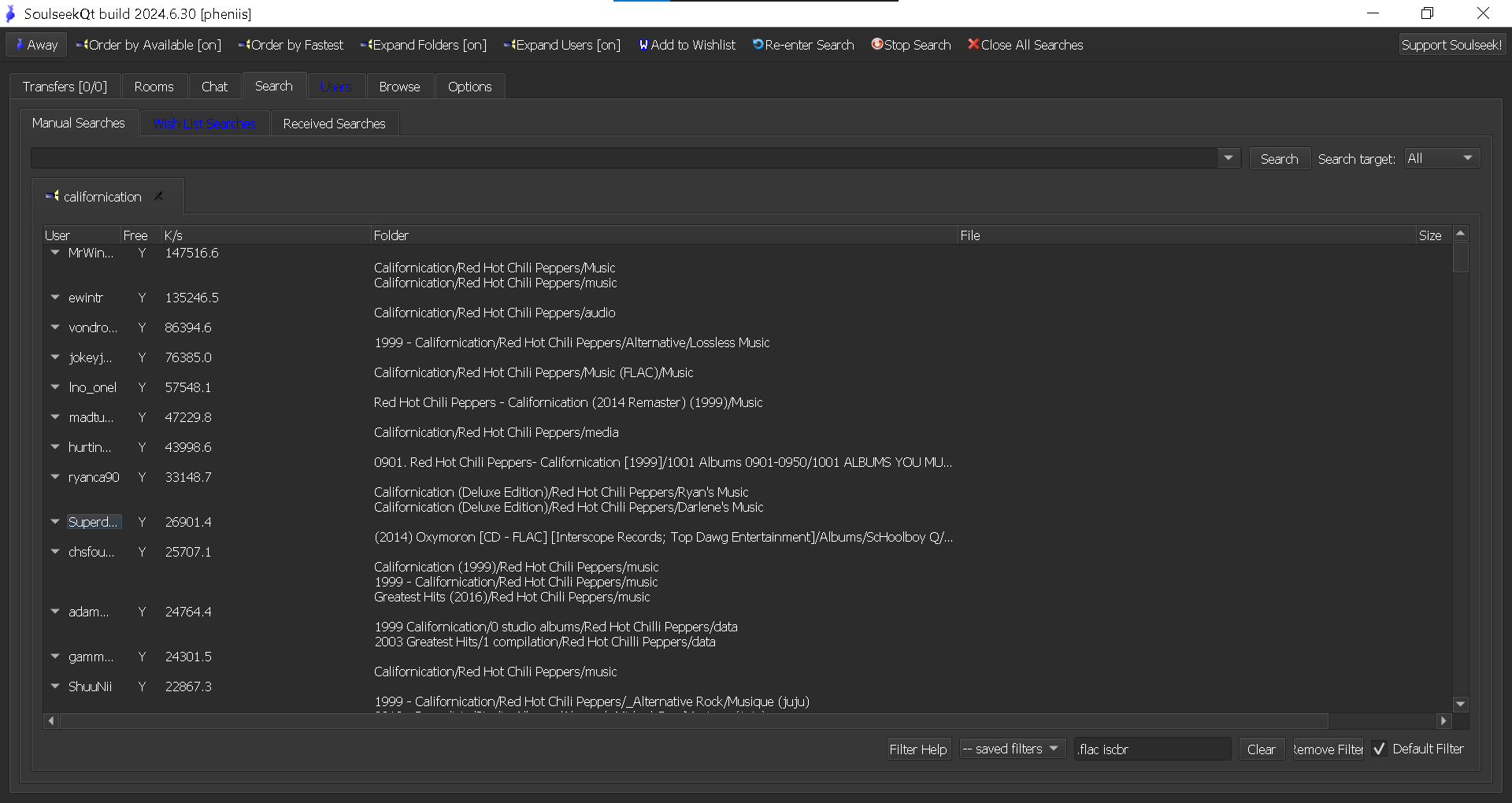
From here you can right-click whichever looks best to you and download your music!
But, you may have noticed some text in the bottom right corner, that's the filter section. This allows us to sift through the large majority of undesirable files.
What you class as "undesirable" is entirely up to you, but I would be remiss if I didnt guide you in the right direction.
The basic rule of thumb goes as follows:
- MP3 is best for devices with little storage space, think iPod, phone, USBs
because it compresses the audio data, bringing a 50MB file down to just 5MB
- FLAC is best for dedicated music devices, this is due to it being a lossless format while still using less space than the next option
- WAV is best for archiving music as it contains every piece of audio data that it was initially exported with.
If you're interested in an in-depth explanation of different audio files, this is not the place for it. There are many resources that can accurately inform you of what Lossy and Lossless audio files are and the difference in quality between them all. I would recommend familiarising yourself with the format that best suits your needs as it will make using SoulseekQt much easier in the long term.
And for anyone wondering what filter I like to use, here it is:
.flac iscbr
Any other questions you may have can be answered by the "Filter Help" button within SoulseekQt
- Downloading
After finding what you were searched for and right-clicking the file, you should be looking at a context menu, from here click "Download Folder(s)" and you will be given this pop-up.
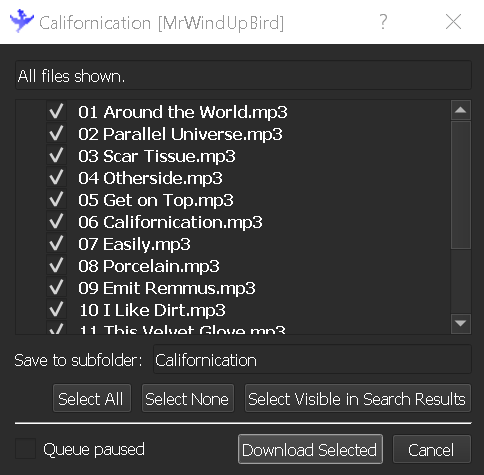
Here you can preview the song files and de-select anything you dont want, then go ahead and click "Download Selected"
And there you have it, you have just downloaded music illegally, scary I know. From here we will catch up with our friends who chose lucida.to in the Metatagging section.
But not before I mention the proverbial elephant in the theoretical room. SoulseekQt is a peer-to-peer filesharing service, meaning that everything you download comes from a real person, not a server; in fact, the people are the servers. This means that without people sharing their music libraries, you wouldn't have been able to get this far in the first place, so please PLEASE PLEASE share your music library when you can, you don't have to host a server in your bedroom but you should at the very least have your library accessible and available while you are using SoulseekQt.